Both, Helium 10 and SellerApp belong to the best Amazon seller tools and work really well. However, despite both being great tools, they are actually different and have distinct pros and cons.
Helium 10 provides Amazon sellers with 30+ tools for product research, keyword research, keyword tracking, listing optimization, and many more. The platform serves both beginners needing basic features and established sellers requiring advanced analytics and automation.
SellerApp is also a software for Amazon sellers and offers simple tools for product research, keyword research, listing optimization, advertising optimization, and analytics… so which Amazon seller tool should you choose? Let’s cut through the marketing BS and figure out which one you actually need.

Find Winning Products With Helium 10
Overview of Key Differences
Helium 10 and SellerApp are both powerful Amazon seller tools. While they share several overlapping capabilities, they also differ in some areas that can impact how you run your Amazon business.
In this section, we’ll break down the key differences between Helium 10 and SellerApp. In our opinion, these lay in the following areas: feature breadth, data quality and ease of use. This comparison will help you quickly identify which solution is better aligned with your business.
Feature Breadth
When comparing the feature breadth of both tools, we first need to claim that Helium 10 wants to be everything – and honestly? They mostly pull it off. Product research, keyword tools, listing optimization, email automation, landing pages – they’ve got tools I didn’t even know I needed. In the following video, you will find an high-level overview of all the main Helium 10 tools:
SellerApp is a little different here. They also offer data-driven tools for Amazon sellers, but all in all they only have 10 tools. Compared to that, Helium 10 offers more than 30 tools at the moment – so this one is actually a big difference!
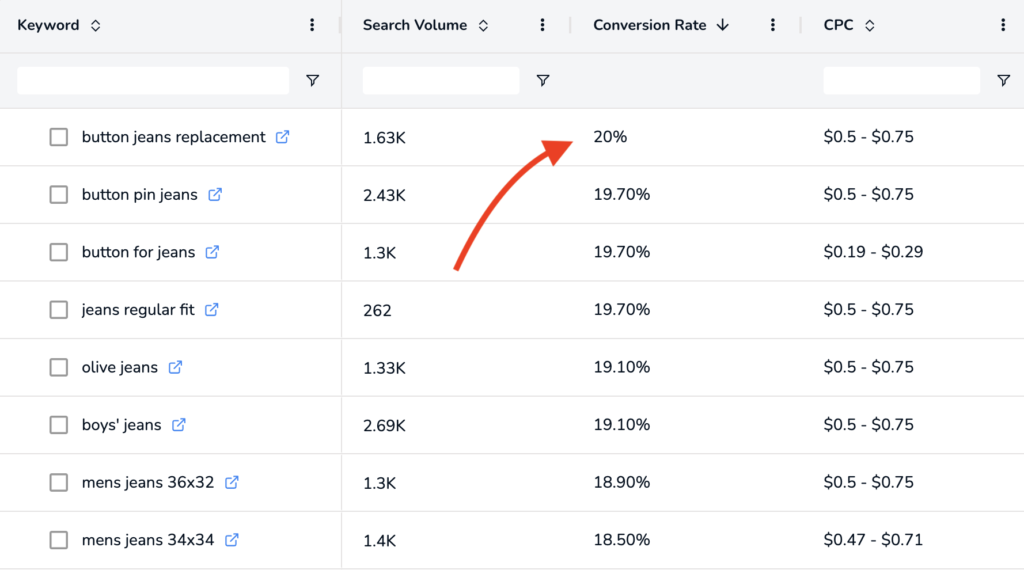
However, one also needs to mention that SellerApp has some “special” features. For example, their AI doesn’t just spit out keyword suggestions; it tells you which ones will actually make you money on Amazon, by showing you the conversion rate of the keyword suggestions:
Data Quality
Numbers also matter when comparing Helium 10 and SellerApp. Helium 10 tracks 450 million products within their product database. That being said, when you’re doing product research, for example with Black Box, you can filter through a database of 450 million products – that’s a lot.
SellerApp? They say their product database has about 100 million products. 100 million products in the database is not bad, but when you need to dig deep into obscure niches? Then, Helium 10’s extra 350 million products come in handy.
So, when you mainly want to do product research with your Amazon seller tool, we recommend Helium 10. Plus, we highly recommend checking out these articles to learn product research with Helium 10:
Ease of Use
On the comparison platform G2, SellerApp gets a 9.5 points for ease of use and Helium 10 gets an 8.1. But where does this difference come from? First of all, the tools from Helium 10 may be more complicated to learn and understand than SellerApp. Overall, SellerApp may also have the cleaner interface.
But why is that? Well, you have to consider that Helium 10 offers many more features and possibilities to use the tool than SellerApp. For example, let’s take a look at SellerApp’s Keyword Research Tool. You only have the keyword input here:

And after hitting the search button, you will see the results in a clear list:
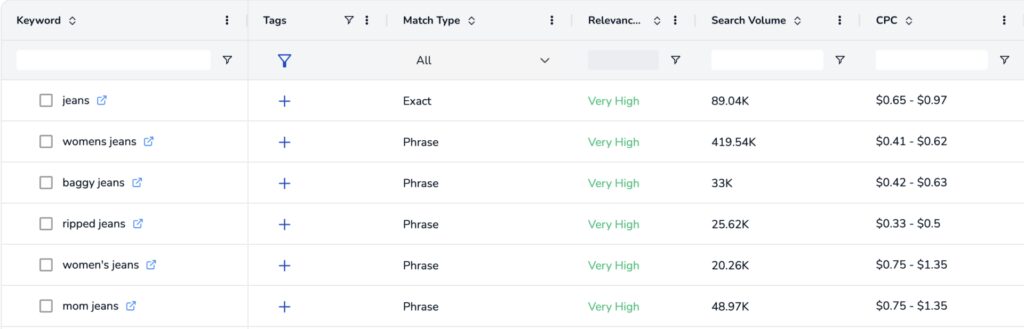
Let’s take a look at how the situation is with Helium 10. Here, you have two keyword tools at your disposal:
First of all, you can use Magnet to find keywords based on one seed keyword. Second, you can use Cerebro to do a Reverse-ASIN-Search so you can find the keywords your competitors are ranking for.
Taking a closer look at Magnet, you can also use several filters to find exactly the keywords that you are looking for (you can also use them with Cerebro of course):
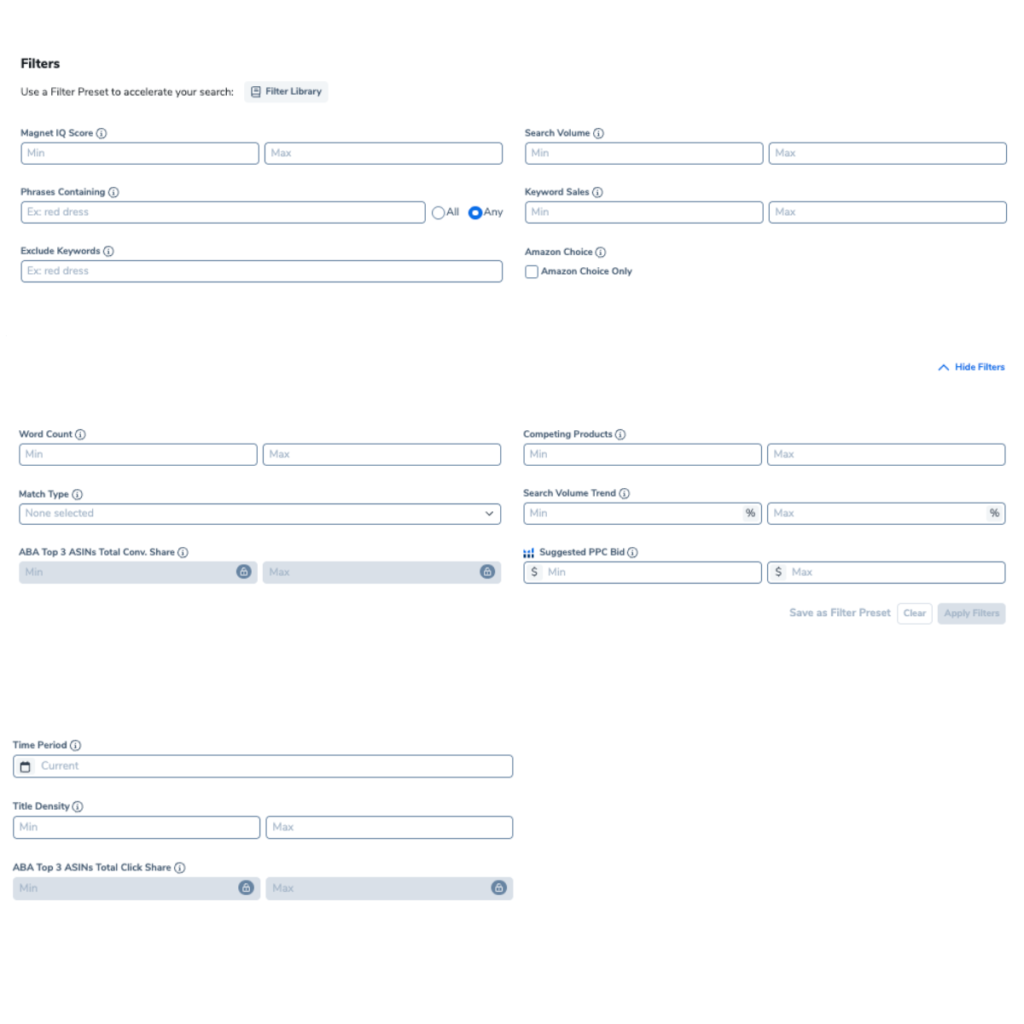
Plus, they offer some super useful metrics like the 8-Days-Giveaway Score. Wondering what this is? The score tells you how many products you need to sell over 8 days to get on the first page of search results for this keyword.
So when it comes to the question which tool is easier to use, one must keep in mind that Helium 10 offers more features out of the box and therefore is in some cases more complex and harder to use than SellerApp.
Find Winning Products With Helium 10
Product Research Capabilities
Let’s be real – if you’re not finding profitable products, nothing else matters. You can have the best listings, perfect keywords, and ads set up by an Amazon expert, but without a greta product to sell, your Amazon business won’t get very far.
Helium 10
Helium 10 brings three main research tools to the fight:
- Helium 10 Black Box: lets you filter the entire Amazon catalog with insane precision. Want products selling 300+ units monthly with fewer than 100 reviews and 40% margins? Done.
- Helium 10 Xray: shows you competitor data right on Amazon’s pages.
- Helium 10 Trendster: reveals whether a product will sell in December or die after Labor Day.
Trend Data
The historical data is where Helium 10 shines. You can see two years of sales patterns. You can avoid a big mistake because Trendster shows you that a “hot” product was actually declining steadily for six months.
Filtering
When it comes to product research, another thing is super important: How many filters you can use to search for products. That being said, in our opinion Helium 10 offers the most filters compared to any other product research tool you can use. Just take a look on how may filters Helium 10 Black Box provides:

Especially useful is that you can filter products according to the number of competing products, the number of images in the listing or the shipping size. This can really help when doing product research.
SellerApp
SellerApp doesn’t have three separate product research tools. They have one. And this one is actually very simple. Compared to the tools from Helium 10, you only have a few filters that you can use to search through their product database:
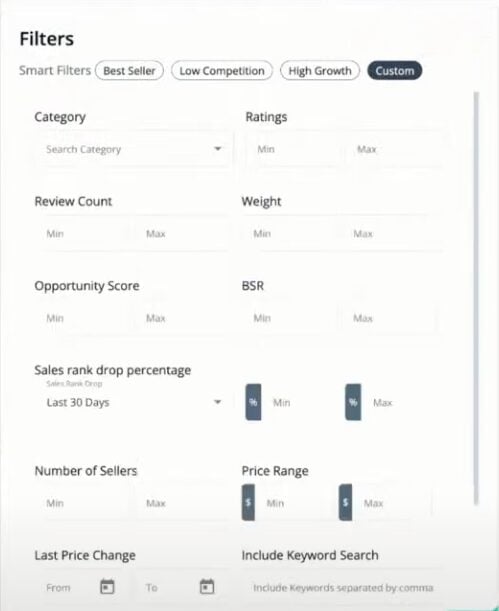
When you type in your criteria and then hit the search button, a list appears that is showing you all the available products:
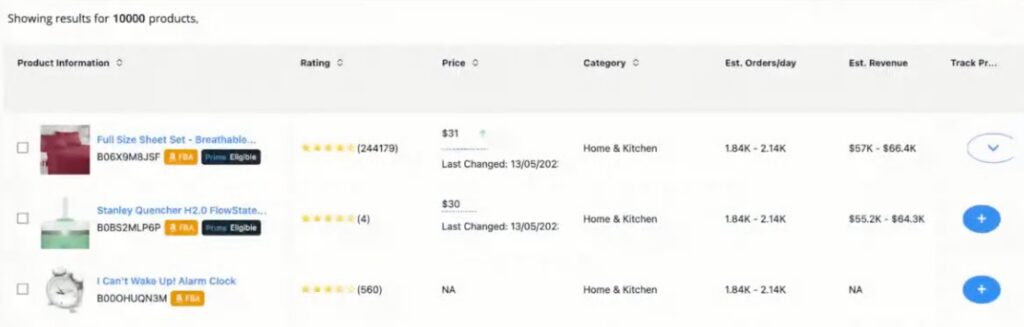
Comparing Helium 10’s product research capabilities and SellerApp resulted in a clear winner in our opinion. If you want to do product research, you should use Helium 10 for finding new products.
Keyword Research Capabilities
Both platforms understand that keywords are the foundation of Amazon traffic. However, both tools take slightly different approaches when it comes to keyword discovery, analysis, and how that data is applied to listing optimization and setting up Amazon PPC.
Helium 10
If you want to do keyword research, Helium 10 provides several tools:
- Cerebro (steals competitor keywords)
- Magnet (finds related keywords)
- Misspellinator (finds profitable typos)
Magnet
Using all three together is powerful. Start with Cerebro to see what’s working for your competitors. You can type in an ASIN and actually see for which keywords the products of your competitors are ranking for:
Cerebro & Misspellinator
You can then use Helium 10 Magnet to find more keywords based on this research and then use Helium 10 Misspellinator to find misspellings of these keywords. These keyword tools work well together and you can use them to build a comprehensive keyword strategy.
SellerApp
SellerApp keeps it simple: one research tool. Nothing fancy, and they kept it pretty simple. Let’s take a look at the tool. You only have the keyword input here:
And after hitting the search button, you will see the results in a clear list:
So when it comes to keyword research, I recommend using Helium 10 since their keyword tools are more comprehensive that SellerApp’s. SellerApp offers a clean and simple interface, but Helium 10 has better features.
BTW: You can also search for keywords for free with our Amazon Keyword Tool. With this tool, you can find keywords based on one seed keyword or find the keywords your competitors are ranking for on Amazon.
Find Winning Products With Helium 10
Amazon Listing Optimization
Six dedicated listing optimization tools from Helium 10 compared to a single all-in-one solution from SellerApp. This highlights a clear difference in how each platform approaches Amazon listing optimization.
Helium 10
Helium 10’s approach feels like surgery – each tool does one specific thing:
- Frankenstein processes keyword lists
- Scribbles helps write listings
- Index Checker confirms Amazon actually sees your keywords
- and more…
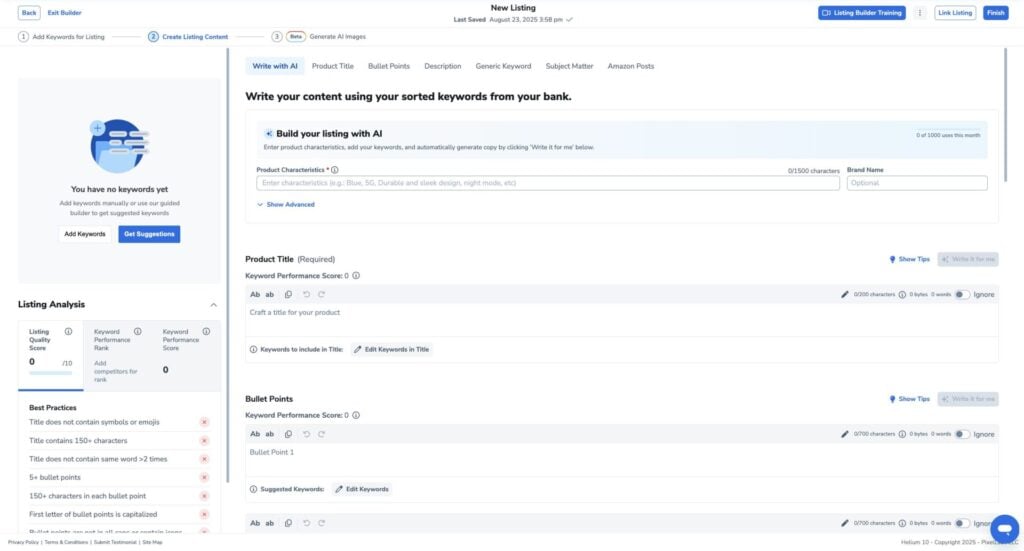
For example, you can also use Helium 10’s Listing Builder to build high quality listings:
SellerApp
SellerApp takes an AI-driven approach to listing optimization. The platform claims users see an 83% increase in organic traffic after implementing its optimization recommendations. SellerApp’s standout features include:
- Multi-platform support: Works with Amazon plus 11 other e-commerce platforms (versus Helium 10’s Amazon and Walmart only)
- Listing Quality Index (LQI): Provides instant scoring to identify your best and worst performing listings at a glance
- AI-powered insights: Analyzes both search visibility and product appeal factors
The Verdict: While Helium 10 offers more individual tools, SellerApp’s multi-platform capability and LQI scoring system provide better value for sellers operating across multiple marketplaces or those wanting quick performance insights.
Amazon PPC Capabilities
Both platforms provide features for Amazon PPC, but they take slightly different approaches to campaign creation, optimization, and performance analysis.
SellerApp
SellerApp excels in marketing automation, particularly with its PPC Optimization Tool that delivers:
- Campaign Automation: Runs and optimizes ads automatically
- Waste Elimination: Identifies and cuts underperforming campaigns
- Bulk Management: Edit multiple campaigns simultaneously to save time
- Performance Analytics: Detailed breakdowns of ad spend and conversion metrics
This approach reduces advertising costs while improving campaign performance, making SellerApp particularly valuable for sellers who want automated PPC management.
Helium 10
Helium 10 takes a different similar approach with Helium 10 Ads. Helium 10 Ads can cut your ACoS dramatically. Not through magic – through smart automation. The AI adjusts bids based on performance. It harvests converting search terms automatically. It adds negative keywords without lifting a finger.
The dayparting feature alone is really worth it. For example, Helium 10 Ads can push bids during those hours and pulls back overnight. Set it once, forget it forever. Here are also some other use cases for Helium 10 Ads:
- Auto-pausing: Keywords with ACoS over 45% get killed automatically
- Bid boosting: Terms converting above 20% get more budget
- Budget shifting: Money flows from dead keywords to winners
- Search term harvesting: Finding long-tail keywords
The winner here? In our opinion, Helium 10 Ads is better than SellerApp when it comes to advertising automation, because it is just newer and it feels more like from today.
Find Winning Products With Helium 10
Amazon Operating Tools
Operating tools don’t really help when you need to build an Amazon business. However, they can save you time to run your business – time you can use to make something more efficient.
In the following, we compare Helium 10’s operating tools against those from SellerApp and see which tool provides the better ones.
Helium 10
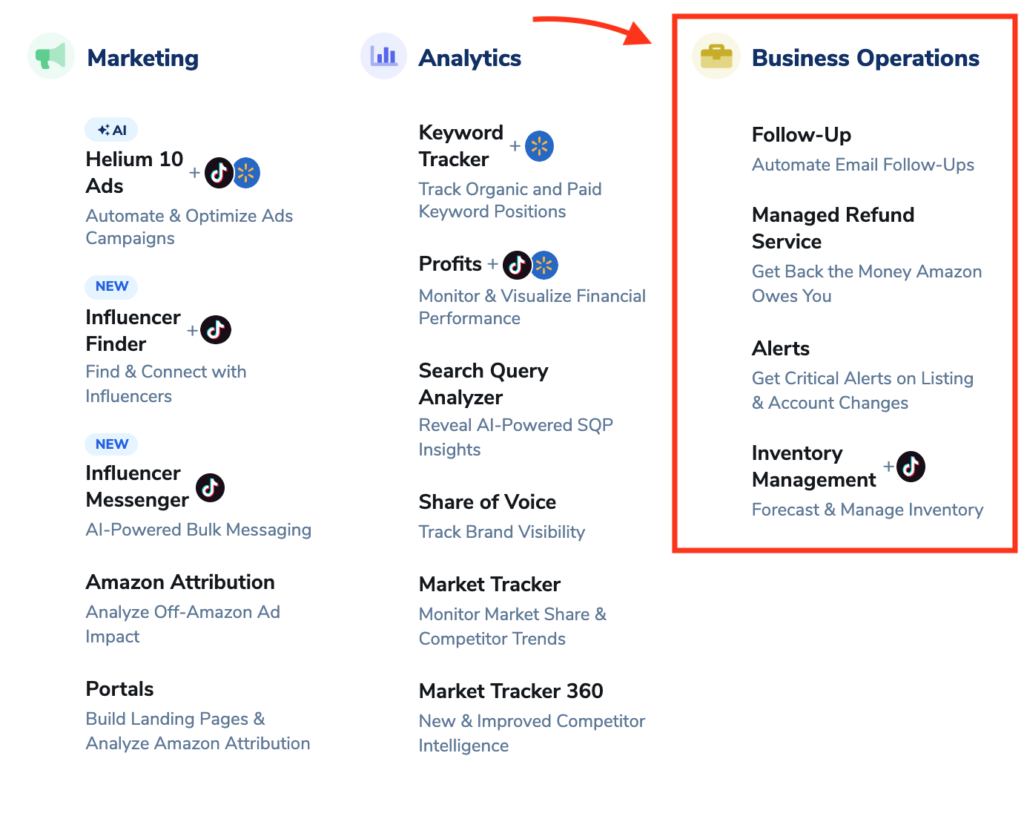
If you’re looking for tools to run your Amazon business, Helium 10 offers many with distinct features:
- Inventory Management: helps avoid stockouts or overstocking, and offers restock recommendations
- Refund Genie: identifies and recovers money Amazon owes you for lost or damaged goods… or other FBA issues
- Alerts: watches your listings for changes or threats – such as hijackers or unexpected price changes
- Follow-Up: automates post-purchase communication with customers, helping with review requests
- Seller Assistant: request customer feedback to get more star ratings
- Profits: analytics dashboard to monitor your operations
All these tools can help you to run your Amazon business on a daily basis and potentially save you lots of time. Let’s see what SellerApp brings to the table…
SellerApp
Although SellerApp does not have many tools with different names like Helium 10’s Refund Genie or Inventory Protector, it also offers few core tools that support daily operations.
Alerts & Profits
At the heart of SellerApp’s operational tools is its alerts system, which notifies you about suspicious activity or changes that could affect your listings or account health, similar to what Helium 10 provides. Moreover, SellerApp also includes profit tracking and analytics to support better decision-making.
Conclusion
In conclusion, Helium 10 generally comes out ahead as the better choice if your focus is on operating tools, especially if you want a more all in one solution. SellerApp is a more lightweight solution with only the alters system and the profit dashboard.
Product Sourcing Tools
When it comes to product sourcing, both Helium 10 and SellerApp use Alibaba to help Amazon sellers find the right suppliers.
What they offer
Through the Helium 10 Chrome Extension you can quickly jump from evaluating a potential product on Amazon to finding suppliers with filters for price, minimum order quantity, supplier rating, and other criteria.

Both tools offer similar filtering options, including ratings, price, minimum order quantity, and supplier country, but Helium 10 stands out by letting you filter by vendor age, which can be especially useful for vetting suppliers.
Conclusion
All in all, we conclude that the overall sourcing features are on the same level. Keep in mind, however, that Alibaba’s prices can sometimes be higher than sourcing from suppliers outside the platform, so good supplier research beyond these tools can still lead to better deals.
Find Winning Products With Helium 10
Helium 10 vs. SellerApp: Pricing
SellerApp has a complicated pricing structure. Their pricing depends on the following things:
- How many ASINs are you looking to optimize?
- What is your total monthly ad spend(USD)?
- What is your total monthly revenue(USD)?
Based on this, the monthly pricing changes. For now, we assume that we can optimize up to 50 ASINs, spend no more than $5k on monthly ads and have a maximum revenue of $10k per month. With these settings, they offer these pricing plans:
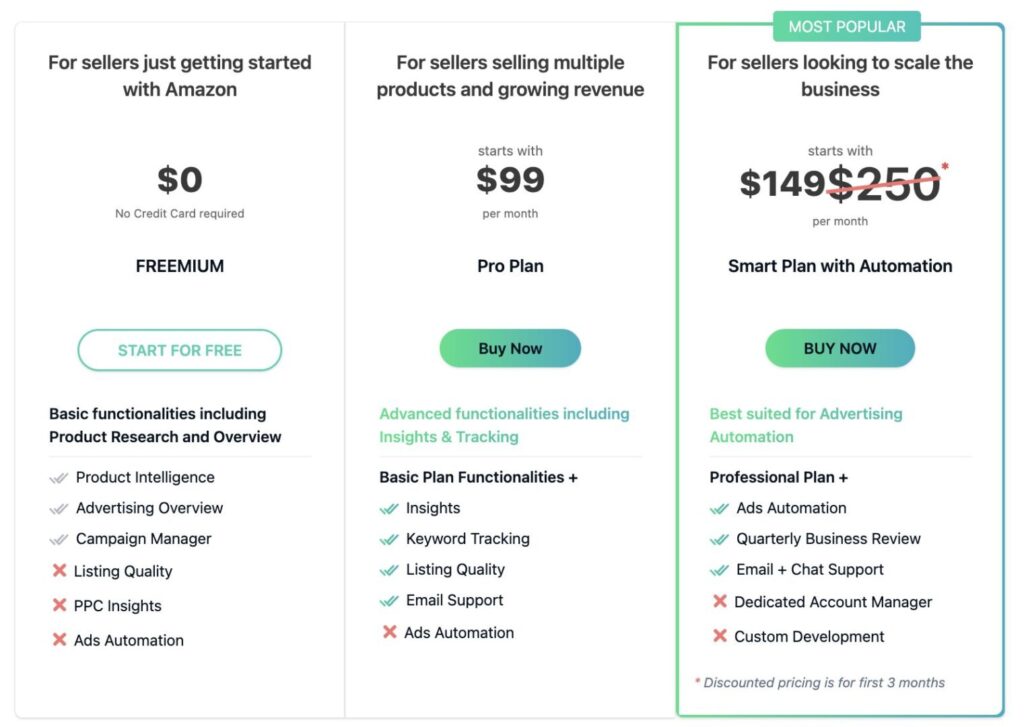
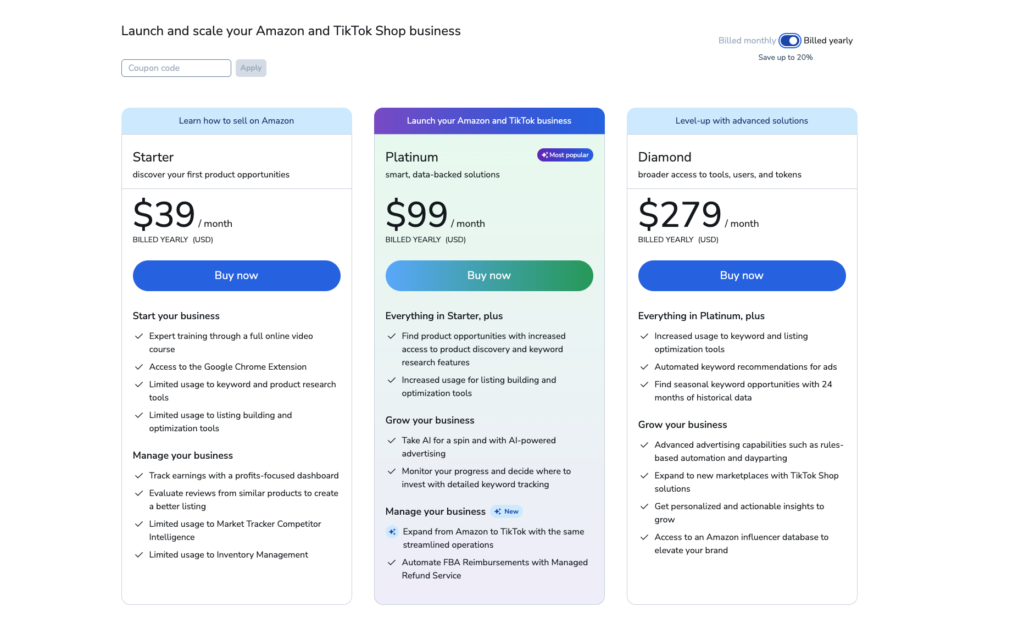
Helium 10’s pricing reflects their everything-included approach (and it is actually simple):